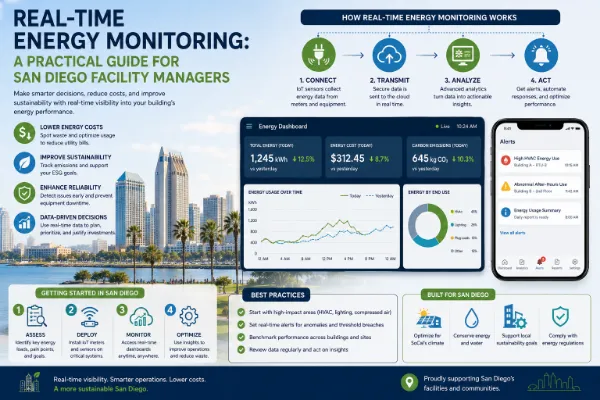
Most San Diego facility managers already know roughly what their building spends on energy each month it's on the utility bill. What real-time monitoring adds isn't a bigger number, it's resolution: knowing which system, on which floor, at which hour, is actually driving that number, and being able to act on it before the bill arrives rather than after. With SDG&E's commercial rates up roughly 10% in 2026 and California's compliance requirements growing more data-intensive by the year, that resolution has gone from a nice operational upgrade to something closer to a practical necessity. This guide walks through how to actually set one up, in a sensible order.
The most common mistake facility managers make is jumping straight to sensor selection before understanding what they're actually trying to measure. Pull twelve months of utility billing data first, ideally interval data rather than just the monthly total SDG&E and most utilities can provide this on request, and it's the same "Green Button" interval data increasingly used in solar and demand-response planning. This baseline tells you where your building's load actually concentrates by time of day and season, which should directly inform where monitoring investment goes first, rather than instrumenting evenly across a building regardless of where the actual spend is.
For the overwhelming majority of San Diego commercial buildings, HVAC represents the single largest controllable share of the energy bill commonly 40% or more of total consumption in office buildings specifically. This makes it the near-universal starting point for real-time monitoring, regardless of building type. Practically, this means:
- Circuit-level submetering on major HVAC equipment rooftop units, chillers, air handlers installed via current transformers that clamp onto electrical panels without requiring a service interruption.
- Zone-level temperature and occupancy sensors in a representative sample of spaces, prioritizing high-traffic or high-variability zones over uniform building-wide coverage on a first pass.
- Runtime and cycling data from building automation system integration where one already exists, since erratic short-cycling is often both an energy waster and an early maintenance warning sign worth catching either way.
Only after HVAC monitoring is in place and generating trustworthy data does it usually make sense to expand into lighting, plug loads, and other secondary systems trying to instrument everything simultaneously tends to produce a flood of data nobody has time to actually review.
Before signing a monitoring platform contract, get clear on three practical questions: does the platform integrate with your existing building automation system, or will it operate as a parallel, disconnected system that adds another login to check? Does it export data in a format compatible with ENERGY STAR Portfolio Manager, given San Diego's local benchmarking ordinance and California's statewide AB 802 requirement both use that platform for compliance reporting? And who on your team actually needs real-time alerts versus a periodic summary report over-alerting is a real failure mode, and it trains staff to ignore notifications just as reliably as under-alerting does.
A monitoring system that reports data nobody acts on isn't providing much value beyond a nicer-looking utility bill. The systems that actually change operating costs are the ones tied to specific, pre-defined thresholds that trigger a defined response not a generic "energy is high" alert, but something like "chiller running outside expected efficiency range for this outdoor temperature, dispatch a technician" or "after-hours HVAC runtime exceeded scheduled occupancy by more than 30 minutes, check scheduling override." Building these specific, actionable thresholds takes more upfront work than accepting a vendor's generic default alert package, but it's what separates a monitoring system that changes behavior from one that just adds a dashboard.
Facility managers evaluating vendors will run into a real fork in the road: standalone submetering hardware paired with a basic dashboard, versus a fuller platform that bundles monitoring, alerting, and compliance reporting together. The standalone route is usually cheaper upfront and gives more flexibility to mix and match best-of-breed sensors, but it puts the integration work getting data into a usable, compliance-ready format on the facility team's shoulders. A bundled platform costs more but generally arrives with the ENERGY STAR Portfolio Manager export and alert-threshold configuration already built in. For a facility manager without dedicated data or IT support, the platform route is usually the more realistic choice, even at a higher sticker price, simply because the integration labor that the point-solution route requires often gets underestimated during initial budgeting.
| Building Scenario | Typical Investment | What's Included |
|---|
| No existing BMS, wireless overlay | $0.50–$1.50 per sq ft | Circuit submetering, zone sensors, cloud dashboard |
| Existing BMS, integration and gap-filling | $0.25–$0.75 per sq ft | Bridging existing controls to a modern analytics platform |
| Ongoing software and connectivity | $0.05–$0.15 per sq ft, annually | Platform subscription, alerting, reporting |
Most San Diego facility managers see measurable savings commonly reported in the 15% to 30% range within the first year once monitoring is paired with actual operational changes, though the honest caveat is that the monitoring itself doesn't save anything; it's the response to what the monitoring reveals that produces the savings, which is why the alert-threshold work in Step 4 matters as much as the hardware installation.
This is where real-time monitoring earns its keep twice over for San Diego facility managers specifically. Buildings over 50,000 square feet already have to submit annual energy data to the City of San Diego's benchmarking program by June 1 each year, and separately to satisfy the statewide AB 802 requirement, both through ENERGY STAR Portfolio Manager. A facility manager reconstructing that report from twelve months of utility bills every spring is doing manual work that a properly configured monitoring platform automates entirely export-ready data flowing continuously rather than a scramble each reporting deadline. Given that AB 802 non-compliance penalties can run up to $2,000 per day, treating the monitoring platform as a compliance tool from the outset, not just an operations tool, is a reasonable way to justify the investment internally if that's needed.
- Buying sensors before defining the decisions they'll inform. Every sensor should map to a specific question you're trying to answer, not just add another data point to a dashboard.
- Underestimating data cleanup for older buildings. Mapping and correctly labeling points from an aging or undocumented building automation system is often the majority of the actual project effort, not the sensor installation itself.
- Ignoring the human workflow. A perfectly instrumented building with no defined process for who reviews alerts and takes action is a wasted investment regardless of hardware quality.
- Treating this as a one-time project. Thresholds, sensor placement, and reporting needs should be revisited periodically as building use, tenancy, and California's compliance requirements continue to evolve.
One additional pitfall worth calling out specifically for San Diego buildings: assuming a monitoring platform configured for a different climate or building type will translate cleanly to local conditions. San Diego's mild, relatively dry climate produces a genuinely different HVAC load profile than a humid or colder-climate market, and default alert thresholds built around national averages can generate a lot of false positives or, worse, miss real anomalies if they're not recalibrated for local weather patterns. Asking a vendor whether their default thresholds have been tuned for San Diego's specific climate zone, rather than a generic national baseline, is a small question that can meaningfully affect how useful the alerts actually are in practice.
Frequently asked questions
HVAC systems almost always come first, since they typically represent the largest controllable share of a commercial building's energy spend commonly 40% or more in office buildings.
A wireless overlay for a building with no existing building automation system typically runs $0.50 to $1.50 per square foot, while integrating with an existing system costs less, around $0.25 to $0.75 per square foot.
Yes. A properly configured monitoring platform can automate the data collection needed for both the City of San Diego's local benchmarking ordinance and the statewide AB 802 requirement, both of which use ENERGY STAR Portfolio Manager.
Collecting data without defining specific, actionable alert thresholds and a clear process for who responds to them. The monitoring itself doesn't save money the operational response to what it reveals does.
Buildings that pair monitoring with actual operational changes commonly report 15% to 30% energy savings within the first year, though results depend heavily on the building's starting condition and how actively staff respond to alerts.
Integrating with an existing building automation system is usually preferable when possible, since a disconnected, parallel monitoring platform adds another login and dashboard staff have to remember to check.
Related articles

 Energy & Sustainability